In May 2020, I participated in the Magnet Virtual Summit CTF
Competition, which consisted of an iOS Extraction, Android Extraction, Google
Takeout, Windows E01 Image, and a RAM Capture.
I would consider this my first real attempt at competitively
participating in a DFIR Style CTF and I truly enjoyed each and every aspect. Before I get into the solutions I was able to
find, let me start off by saying that I enjoy learning new skills, and I am a huge
fan of open source tools, and validating paid commercial tools with free tools
if possible. With that said some of the
tools I used to find solutions were Volatility, Autopsy, ALEAPP, iLEAPP, Notepad++,
BulkExtractor, Irfanview, unfurl, GCHQ CyberChef, DB Browser (SQLite), and
Cellebrite Physical Analyzer. Also I
have to give credit to Tarah Melton (@melton_tarah) for her presentation on
Memory Analysis, as I had never worked with a RAM Capture before, yet I was
able to solve most of the memory based questions using notes from her session. Also a huge thanks to @evandrix for helping
confirm I was on the right path for some questions. A great job by Jessica Hyde (@B1N2H3X) and
the whole @MagnetForensics Team. Let’s
get started with the Android Section…
Android
- Just another pawn - What is the username for the Zynga Chess
app?
chess.master.chester –
This was found using ALEAPP under Chrome Login Data
- Obfuscating Like a Pro - Chester decided to use a covert app
to communicate with Alan, to try to cover their tracks. What is the package
name of the app? flag<com.full.package.name.here> (Do not include
flag<>, just write out the package name) Hint: https://youtu.be/wEv0zOeA2FU?t=152
Com.zynga.chess.googleplay
– This was found using ALEAPP under the Installed Apps, and could also be found
in the Chrome Login Data found above.
This was based on the previous question asking for the username for the
Zynga Chess App and knowing it had a chat feature.
- The College Lifestyle- Artic Edition - Where did Chester get
ramen in Norway? (Restaurant Name)
Koie Ramen – Since
this was an Android based question and asking for a specific location, I started in the Google Takeout Files.
After finding IMG_20200309_172817.jpg, which was a bowl of Ramen, I
opened the file in IrfanView, viewed the Exif data and then viewed the
Geo-Coordinates in Google Maps. After a
slight zoom you are able to see that the photograph was taken inside of Koie
Ramen Restaurant.
- Blocked for security reasons! - What is the name of the file
that this user attached/linked and emailed to Warren?
Chestnut_CV.exe – Was found
in an email message, parsed by Autopsy, which included the file as a Google
Drive Download/Access Link.
- bOat-SINT - While on spring break, Chester took a photo of a
famous boat. What is the boat's name (2 words, ______ ship)?
Oseberg Ship – Was found
based on the OSINT hidden in the question.
After finding the photograph of the boat (IMG_20200308_144240.jpg) in
the Google Takeout, I used Google Image Search to locate the name of the ship
from the Museum website, which contained a similar image.
- Fastest Thumbs in the West - How many tweets did Chester
tweet?
5 – Was found by
manually digging through the Android Extraction in Windows Explorer and then
viewing the database in DB Browser. The
file is located at \data\data\com.twitter.android\databases, where I looked for
the largest database file which was 1230174369462267904-60.db. I then viewed the Users Table to find Chester’s
ID. Once I had the ID I viewed the
Statuses Table and filtered by Auther.id
- New IP Who Dis? - What local port was Warren's computer
listening on while connected to the IP 13.35.82.31 during the memory dump?
54281 – This was found
by reviewing the output of the “netscan” command on the RAM Capture in
Volatility, which revealed the port number.
- The Polar Express - What train station did Chester get
directions to?
Bergen – Was found by
looking in the Google Takeout under My Activity\Maps\MyActivity.html. Once the file was opened in Firefox, ctrl F
for “station” and it was listed under a Maps search for Directions To Bergen
Station, Bergen, Norway on Mar 10, 2020.
- You Get a Database! And You Get a Database! - Unbeknownst to
Chester and Alan, the app found in the question "Obfuscating Like a
Pro" didn't store their chat logs securely. What is the chat message ID
for where the target of the hack is declared?
18741612351 – Based on
the information identifying the Chess app, I manually searched through the
Android extraction with Windows Explorer to look at the databases. The file was found at
data\data\com.zynga.chess.googleplay\databases\wf_database.sqlite. Reviewing the database you find the message
ID where the target is Mallie Sae.
- Chess Master Chester - What was the first move made by
Chester in Chester's Chess game? (Flag is in chess notation (Ex. A1-B2))
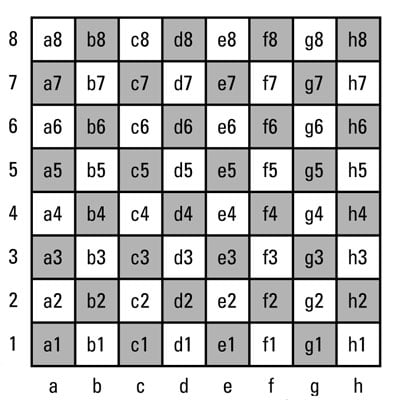
*Chess board for refrence, assume white starts on rows 7 and
8: https://www.dummies.com/wp-content/uploads/201843.image0.jpg
e2-e4 – This one gave
me some trouble at first since I didn’t take the time to identify Chester’s
user ID, so after several wrong guesses, I realized that Chester may not have
gone first. This was confirmed by
finding that Chester is user ID 237046613 in the Users Table. So then using the data in the moves table
x1=4 y1=1, which identifies the pawn on e-2. (Looking Lower left of the chess
board image 1 = 0 and a = 0 for counting purposes) then x2=4 y2=3, meaning the
pawn moved forward two spaces to e-4.
This is also validated, by looking at line 3 of the moves table, and
examining the data column, which displays the prev_board (naming the pieces by their
first initial, and Empty spaces are identified with “e”)
- Take the Red Pill, Chester - Chester configured a moving
matrix background on his phone. What did Chester set the falling speed of the
characters to?
*Demonstration video located at data/media/0/AzRecorderFree
50 – Found while
reviewing the installed apps in the ALEAPP report
(com.gulshansingh.hackerlivewallpaper).
I then manually found in Windows Explorer the preferences stored in an
.xml file located at
data\data\com.gulshansingh.hackerlivewallpaper\shared_prefs. Viewing the .xml in Notepad++ you can see the
“fallin speed” value is 50.
- Best Foot Forward - What was the percentage likelihood that
the Android user was walking on Fri Mar 6 2020 at 20:50:27 UTC
95 – This was found
based on my prior knowledge of data stored by Google in the Takeout related to
Location History. I searched in the
Takeout\Location History directory and then opened the “Location History.json”
in Notepad++ with the JSON Viewer Plugin. Then I used an online time converter to convert the Time/Date Stamp from
the question into EPOCH and searched for the EPOCH value in Notepad++,
which showed a confidence of 95 for Walking.