Showing posts with label @AlexisBrignoni. Show all posts

Tuesday, July 21, 2020

Unsupported Artifacts and How to Deal with them

This blog post will provide a look into dealing with valuable artifacts that are identified, but aren't supported by any of your commercial tools.  This provides a great opportunity to contribute to an open source project such as iLEAPP by @AlexisBrignoni and Yogesh Khatri (@SwiftForensics). 

Like so many of you, the first place I look when my extractions finish parsing is the installed applications.  Funny enough this workflow was covered by @HeatherMahalik and @mattforensic on their podcast, Carved from Unallocated.  I want to start off by getting a better idea of what applications are on the device.  While checking out the installed applications on a recent extraction, I came across the Ookla Speed Test Application.  I had never seen the application before, but I was familiar with the web version, which is commonly used to check download and upload connection speeds.  This is where my curious nature took over, so I started to dig around to see what data was contained in the databases for the application.  I also found it was not parsed by the commercial tool I had used.  To my surprise it was a goldmine of artifacts that would be extremely helpful for this particular case, and likely many others.   

After participating in the 2020 Magnet Forensics Virtual Summit CTF, I became quite familiar with the capabilities of DB Browser for SQLite.  So I exported the speedtest.sqlite database for the Ookla Speed Test Application and went to work.  While inspecting the contents of the database, I found the most valuable information in the table called ZSPEEDTESTRESULT.  This table contained data related to Date, Time, Internal IP Address, External IP Address, Cellular Carrier, ISP, WIFI SSID, Device Make/Model, Latitude/Longitude, and Accuracy related to the Lat/Long data.  Some might be wondering why this is so valuable, but when was the last time you had an artifact for a phone that had a date/time stamp to go along with the IP Address that the device was connected to.  Not just the internal IP Address, but the external IP Address.  So now we have an IP Address to plot on our timeline, but that's not all, we also have GPS Data.  We can now plot the GPS, with a date and time, and the external IP Address.  Imagine the uses for this type of information in intellectual theft cases where the suspect checks upload speeds prior to exfiltrating the data or CSAM where the suspect checks their download speeds at a local free wifi spot.

Let's dig deeper into how helpful some of the other data might be.  The device make/model could be helpful, since the data is stored in an unencrypted backup, and can be restored, connecting multiple devices, again via IP Address and GPS Location data.  The SSID can be searched through Wigle.net to try and locate a unique SSID. 

Now that we have located the data, it was time to perfect our SQLite queries to parse the data that we want to use.  With a little bit of extra time we are able to build a device make/model conversion into the query.  After we have our SQLite query built and we are happy with the data output, we then check out the videos on YouTube by @AlexisBrignoni which provide step by step instructions on creating new artifacts for iLEAPP. 

Creating the new artifact was quite the adventure, but a very rewarding process.  I sent countless messages to @AlexisBrignoni, trying to perfect the script so that the application artifacts could be parsed by iLEAPP and presented in the report it generates.  After I was able to get the scripts to run properly, I needed to confirm the data.  So I used my test device, which is an iPhone SE, running iOS 13.5.1, to download the Ookla Speed Test Application and ran a few network checks.  I noted my external IP Address, the SSID I was connected to, as well as my location.  I then conducted a iTunes Backup of my test device.  After reading the blog post by @AlexisBrignoni, which covers normalizing the iTunes Backups with the help of the script created by Edward Greybeard (https://github.com/edward-greybeard/iOS-UNF).  Now with the iTunes Backup normalized, I was able to validate the all of the data from my test device including the data related to the GPS Location Data, External IP Address, and SSID. 


The new artifact was merged into the main Github repository for iLEAPP and is now available for everyone to use. 

A huge thanks to @AlexisBrignoni for all his work on iLEAPP and for all of his help getting the scripts right to add the new artifact. 


Friday, June 19, 2020

#MVS2020CTF Write-Up (iOS)

Here is the last Write-Up for the #MVS2020CTF.  During the live competition, I wasn't aware of any "free" tools to analyze iOS systems, so I fell back on Cellebrite PA and was able to find several flags quite easily.  After the live event, I found out about #iLEAPP by @AlexisBrignoni and re-processed the iOS data.  This allowed me to try out a new tool and gave me an opportunity to validate the flags found with PA and iLEAPP, since both tools were generating the same answers.  This post will focus on the flags found with iLEAPP to continue with the #OpenSource theme for the #MVS2020CTF.  I will have a more detailed post in the coming weeks regarding creating new artifacts for iLEAPP and ALEAPP (the Android parsing tool by @AlexisBrignoni).  Without further delay here are the flags that I was able to find. 

Once again a huge thanks to the folks at Magnet Forensics for putting on a great virtual summit and for putting together a CTF that focused on finding some pretty unique artifacts as flags and encouraged the use of #OpenSource tools.

  • Account Scout
What's the Apple ID email associated with this device

Flag should look like: flag<sally@mail.com> (Don't include flag<>)

After running the iOS extraction through iLEAPP, we open the main index file for the full report.  Looking at the Accounts - Account Data we see the flag for the Apple ID as abrunswick8675309@gmail.com.


  • What's in the toolbox?
What tool was used to perform the acquisition on this device? Note: You only have 1 attempt

 EnCase
 Magnet Axiom
 Mobile Evidence Acquisition Toolkit
 Cellebrite

Based upon the inclusion of the MEAT Log, the flag for this question is Mobile Evidence Acquisition Toolkit.

  • I would walk 3,264 miles just to hack you tonight
What is the name of this user's favorite city in Apple Maps?

The flag for this question was Loserville, but I don't remember where I found this flag.  I found this early on before I decided to start a blog and started documenting the process of where the flags were found.

  • Not a HIPAA Violation
What medication is this user currently on?

This flag can be found searching "Medical" in Cellebrite to get the Medications; however it could also be found with a search of "Medical" in Windows Explorer, which brings you to private\var\mobile\Library\MedicalID\MedicalIDData.archive.  Open this file in Notepad ++ and you see that the medication is Lysergic Acid Diethylamide.


  • Who am I?
What's the name of this device?

So this could actually be found in multiple places in the iLEAPP report.  First it can be found on the Report Home page and then the Device Details Tab as shown below.


The second location within the iLEAPP Report would be under the Data Ark Artifact along the left side of the report.  The flag is Alan's Fantastical iPhone


  • Ye ole 9 to 5
What is the company associated with the contact "Chester Russell"?

This was another flag that was found early on and I only found it in the Cellebrite PA Report.  In the contacts section you can see that Chester Russell has the company "APT802" listed.

  • Back in my day we weren't glued to our phones
How many seconds did the user have Safari open between the hours of 12:00:00 and 20:00:00 on March 23rd, 2020?

Only enter the number

I did not find the flag for this question.

  • Creeper aw man
Looks like a MineCraft server was hosted on this device?? Find the username of a player who has joined

For this flag it was more of a manual process.  I started by using the search within Windows Explorer to look for "Minecraft" within the iOS extraction.  This produced a result of a settings.ini that let me to the directory of usr\dev\cuberite\Server\Players\67\ where there was a .json file.  I opened the .json file in Notepad++ using the JSON plugin and found the flag of
"Thad_Castle_"


  • Hackerman
What is the first IP address that this user targeted via a popular hacking tool?

I didn't find the flag for this question, but after reading other Write-Ups I see where I overlooked the bash history for the app. 

  • Near Flag Communication
What is the Tag ID of the scanned NFC tag? Remember MC questions have a 1 attempt limit

 377EE22E104347
 AD2A7A3E3C63F7
 96C8E50757329E
 E5DB5FE6A6984D
 041146220F5E80
 2D52E5017D690E
 64DCD00FD51BFB
 64DCD00FD51B03
 925F65AC9786B6

I did not find the flag for this question.
  • Check out my Spotify
This user's Spotify playlist is looking a bit suspicious..?

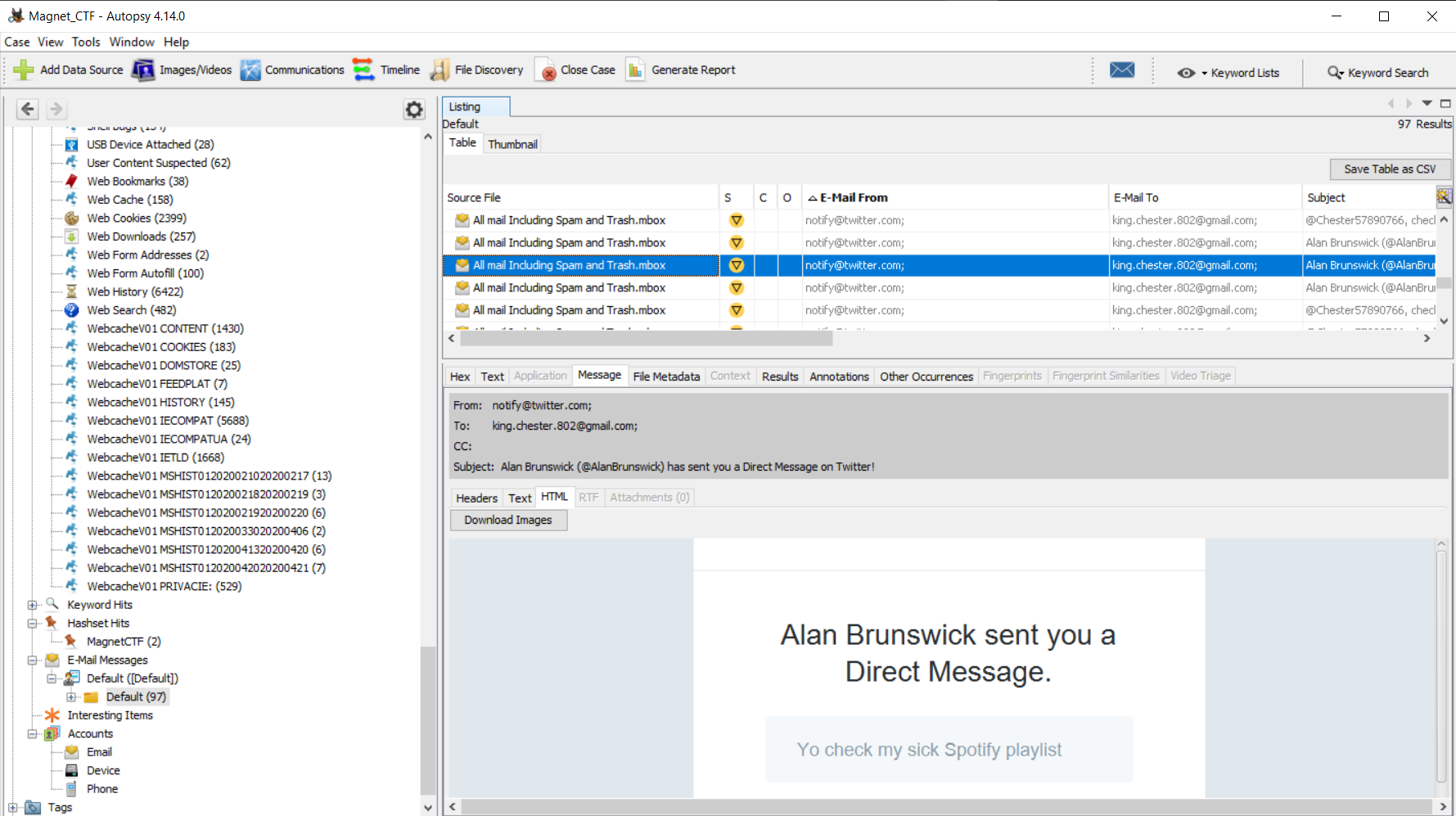
So this one took up quite a bit of time, but ultimately did not find the flag with the iOS data.  While searching for a different flag, I came across several Twitter Direct Message notification emails in the Google Takeout Mbox file. 


There was mention of Spotify, so I started to follow the links sent in the DM email notifications and landed on a Spotify playlist. 


The flag is comprised of the three songs on the playlist "


  • Plug it in plug it innnn
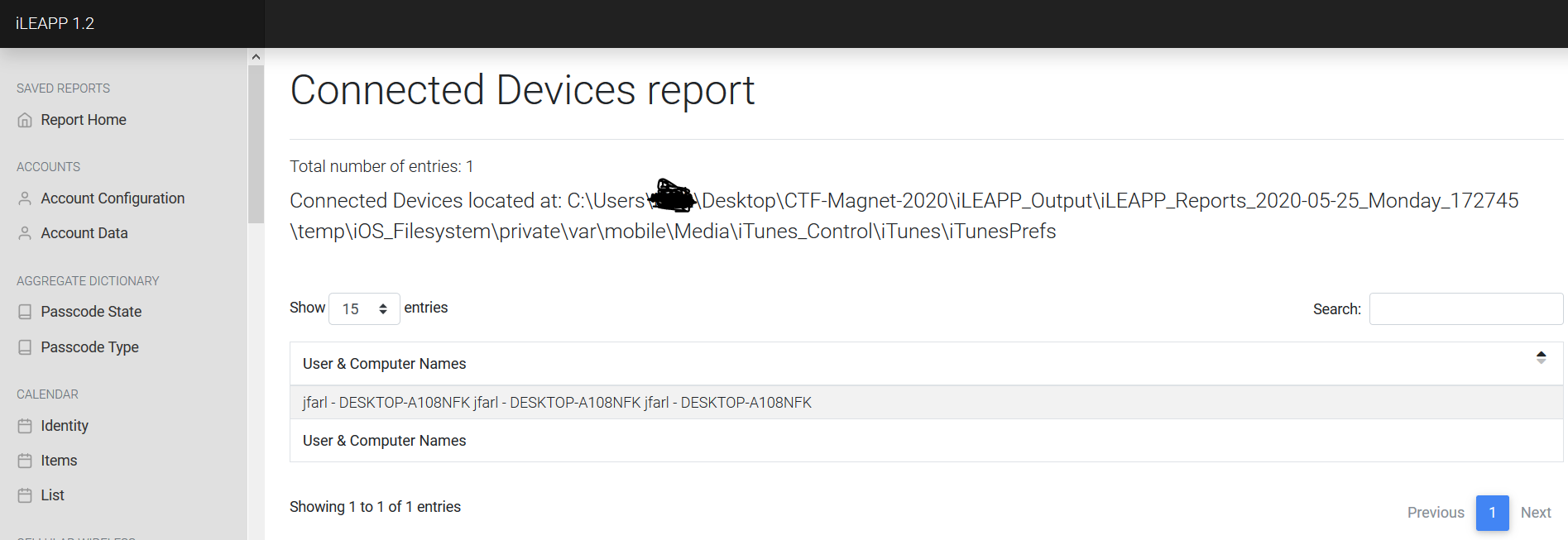
What is the name of the computer that was used to sync with this device?

This flag again can be found in multiple places.  One place is again iLEAPP Report Home on the Device Details Tab.  The second place is the Connected Devices Report.  The flag was DESKTOP-A108NFK.


  • SNAP.. That's going int my cringe compilation
How many applications have iOS Snapshots?

I did not find the flag for this question.

  • Spraaang Breaaaak
How many guests were registered in the trip to Disney?

Warning: You only have 3 attempts at this

I did not find the flag for this question.

I encourage everyone to go and check out iLEAPP by Alexis Brignoni and the YouTube videos he is putting together.  Get involved in the community, support and contribute to Open Source Developers, but above all get out of your comfort zone and participate in a CTF. 

2021 Crack Me If You Can Contest Write-Up

Once again KoreLogic hosted the Crack Me If You Can password cracking contest during DEFCON 29.  I participated in the Street Division as a ...