Thursday, August 26, 2021

2021 Crack Me If You Can Contest Write-Up

Once again KoreLogic hosted the Crack Me If You Can password cracking contest during DEFCON 29.  I participated in the Street Division as a solo entry.  Password cracking is something that I have developed a passion for over the past 5-6 years after realizing that so many in the forensic world struggle with it.  I found a ton of great resources such as the thesis and dissertation by Dr. Matthew Weir (Using Probabilistic Techniques to Aid in Password Cracking Attacks) and prior contest write-ups by @Cyno-Prime, @John_Users, and @hashcat.  The YouTube videos posted from the Password Village from DEFCON 28 are a great resource, especially "Lets crack rockyou.txt, without using rockyou.txt".  I decided this year I would attempt with a single machine with the goal of showing that for certain tasks, the hardware isn't as important as the intelligence, strategy and/or methodologies.  

Let's start with the hardware, which was a 7 year old gaming laptop, running Windows with a GeForce GTX860M, and a fresh install of Hashcat 6.2.3.  Since the rules are clearly laid out that duplicate cracks are not to be submitted, I needed to brush up on creating a workflow to not only properly form my crack submissions, but also to remove the previous cracks.  While I am sure there is an easier way to handle this task, I used a combination of the --show function within Hashcat to create the submission and then used the --left Hashcat function, to create a new hash file that only contained the remaining hashes to continue cracking.  Once I had my cracks in a text file, I used the find/replace feature within Notepad++, along with some GREP, to properly form the final submission text file.  I know this is somewhere that I can improve my efficiency by using a Linux OS and some CLI Tools, to eliminate the extra steps of using the Notepad++ GUI.  

Moving on to the strategies and methodologies, I started with the History_6 hashes, identified the hashes as NTLM and launched a plain brute force attack, which started cracking right away.  While that was running in the background, I grabbed the History_5 hashes, which were also NTLM.  This initially made me think that there was some kind of a trick coming, as this was the first time I have participated in the contest that the hash type wasn't mixed.  I then went back to read the scenario, and immediately remembered the Password Village talk from DEFCON 28 by @Minga called  "Result of Longer Passwords in Real World Application".  During this talk, Minga explained how as corporate password policies evolve, the user typically keeps their passwords similar while still complying with the policy.  This was a huge guess early on, and figured I would commit to this strategy as long as I didn't see anything in the cracks showing a more efficient cracking strategy.  Since History_4 and History_3 wouldn't be released until later in the contest, I would have a few hours to crack and analyze to see if the methodology would benefit me in the long run. 

As I began to look at the cracks, I saw several patterns that I wanted to exploit early on, so I stopped the straight brute force attack and started with various mask attacks.  Some of the patterns I saw were, digits at the front, digits at the end, all lower, uppercase first character, and all digits, so I played around with several mask variations on both the History_6 and History_5 files and immediately began to see massive increased results, which was not surprising.  A blind brute force should never be used as the only strategy, as that relies on luck alone, and password cracking requires some strategy and intel to be really effective.  I continued with the various masks and then started to notice some of the core words such as numbers, names, cities, and books/chapters of the bible.  With this realization and following the strategy that this contest was based around "users" who had an evolving password policy, I created a fresh wordlist, using all of the previous cracks as a base wordlist.

Once the History_4 and History_3 were released and I realized they were all NTLM, there was no need to keep them separate, they could all be combined into a single file.  This made my work flow more efficient, as I didn't need to run each mask attack 4 times to cover each of the files, I would just run it on a single combined file.  Suddenly I realized I had been missing out on a huge strategy and benefit, and I couldn't believe that I was so focused on the masks that I had forgotten about the --loopback function to load the found cracks back into the attacks.  I also realized that I had not used any rules, which was also a huge oversight, as the tunnel vision had set in on the masks and patterns.

After the realization of all the missed/forgotten functions within Hashcat, I took a step back and re-evaluated my strategy, moving back to basics.  When dealing with password cracking, I typically start with wordlists, so I of course started with Rockyou.  As I organized my wordlists, I found a directory that I had created called Korelogic_Lists.  This directory contained several wordlists that I had downloaded several years ago from the KoreLogic website.  These lists included cities, female names, male names, places, books of the bible, months, numbers as words, and sports teams.  This was a treasure trove, which by the way is still available on the 2010 - Crack Me If You Can Contest page.  I combined all of these into a single wordlist, made sure that I was tracking which rules I had used, and started to run through the hashes.  The cracks were flying by, and I had definitely found a great resource that I couldn't believe I had overlooked earlier.  


As you can see in the chart above, once I started to use the --loopback function, as well as rules (instead of masks) and the wordlists that were created around the analysis of the previous cracks, I was able to make quite a bit of progress.  This is definitely where better hardware would have helped, as I realized way too late into the contest some basic strategies had been overlooked.   

Overall the contest was a test of my capabilities, but more importantly really fun.  Hopefully next year I can either join a team, or assemble one as having more than one persons strategy would be beneficial.  Hopefully this helps out others in the DFIR community that struggle with password cracking, and shows that while dedicated hardware can be helpful, the core methodologies and intelligence for password structure makes cracking much more efficient.

A huge thanks to the @passwordvillage and KoreLogic for putting on the contest each year and to @Grifter801 and @defcon for the contests area.  Congrats to all the other participants, especially Team @Hashcat on their win.  Never stop learning and always ask questions.


Tuesday, July 21, 2020

Unsupported Artifacts and How to Deal with them

This blog post will provide a look into dealing with valuable artifacts that are identified, but aren't supported by any of your commercial tools.  This provides a great opportunity to contribute to an open source project such as iLEAPP by @AlexisBrignoni and Yogesh Khatri (@SwiftForensics). 

Like so many of you, the first place I look when my extractions finish parsing is the installed applications.  Funny enough this workflow was covered by @HeatherMahalik and @mattforensic on their podcast, Carved from Unallocated.  I want to start off by getting a better idea of what applications are on the device.  While checking out the installed applications on a recent extraction, I came across the Ookla Speed Test Application.  I had never seen the application before, but I was familiar with the web version, which is commonly used to check download and upload connection speeds.  This is where my curious nature took over, so I started to dig around to see what data was contained in the databases for the application.  I also found it was not parsed by the commercial tool I had used.  To my surprise it was a goldmine of artifacts that would be extremely helpful for this particular case, and likely many others.   

After participating in the 2020 Magnet Forensics Virtual Summit CTF, I became quite familiar with the capabilities of DB Browser for SQLite.  So I exported the speedtest.sqlite database for the Ookla Speed Test Application and went to work.  While inspecting the contents of the database, I found the most valuable information in the table called ZSPEEDTESTRESULT.  This table contained data related to Date, Time, Internal IP Address, External IP Address, Cellular Carrier, ISP, WIFI SSID, Device Make/Model, Latitude/Longitude, and Accuracy related to the Lat/Long data.  Some might be wondering why this is so valuable, but when was the last time you had an artifact for a phone that had a date/time stamp to go along with the IP Address that the device was connected to.  Not just the internal IP Address, but the external IP Address.  So now we have an IP Address to plot on our timeline, but that's not all, we also have GPS Data.  We can now plot the GPS, with a date and time, and the external IP Address.  Imagine the uses for this type of information in intellectual theft cases where the suspect checks upload speeds prior to exfiltrating the data or CSAM where the suspect checks their download speeds at a local free wifi spot.

Let's dig deeper into how helpful some of the other data might be.  The device make/model could be helpful, since the data is stored in an unencrypted backup, and can be restored, connecting multiple devices, again via IP Address and GPS Location data.  The SSID can be searched through Wigle.net to try and locate a unique SSID. 

Now that we have located the data, it was time to perfect our SQLite queries to parse the data that we want to use.  With a little bit of extra time we are able to build a device make/model conversion into the query.  After we have our SQLite query built and we are happy with the data output, we then check out the videos on YouTube by @AlexisBrignoni which provide step by step instructions on creating new artifacts for iLEAPP. 

Creating the new artifact was quite the adventure, but a very rewarding process.  I sent countless messages to @AlexisBrignoni, trying to perfect the script so that the application artifacts could be parsed by iLEAPP and presented in the report it generates.  After I was able to get the scripts to run properly, I needed to confirm the data.  So I used my test device, which is an iPhone SE, running iOS 13.5.1, to download the Ookla Speed Test Application and ran a few network checks.  I noted my external IP Address, the SSID I was connected to, as well as my location.  I then conducted a iTunes Backup of my test device.  After reading the blog post by @AlexisBrignoni, which covers normalizing the iTunes Backups with the help of the script created by Edward Greybeard (https://github.com/edward-greybeard/iOS-UNF).  Now with the iTunes Backup normalized, I was able to validate the all of the data from my test device including the data related to the GPS Location Data, External IP Address, and SSID. 


The new artifact was merged into the main Github repository for iLEAPP and is now available for everyone to use. 

A huge thanks to @AlexisBrignoni for all his work on iLEAPP and for all of his help getting the scripts right to add the new artifact. 


Friday, June 19, 2020

#MVS2020CTF Write-Up (iOS)

Here is the last Write-Up for the #MVS2020CTF.  During the live competition, I wasn't aware of any "free" tools to analyze iOS systems, so I fell back on Cellebrite PA and was able to find several flags quite easily.  After the live event, I found out about #iLEAPP by @AlexisBrignoni and re-processed the iOS data.  This allowed me to try out a new tool and gave me an opportunity to validate the flags found with PA and iLEAPP, since both tools were generating the same answers.  This post will focus on the flags found with iLEAPP to continue with the #OpenSource theme for the #MVS2020CTF.  I will have a more detailed post in the coming weeks regarding creating new artifacts for iLEAPP and ALEAPP (the Android parsing tool by @AlexisBrignoni).  Without further delay here are the flags that I was able to find. 

Once again a huge thanks to the folks at Magnet Forensics for putting on a great virtual summit and for putting together a CTF that focused on finding some pretty unique artifacts as flags and encouraged the use of #OpenSource tools.

  • Account Scout
What's the Apple ID email associated with this device

Flag should look like: flag<sally@mail.com> (Don't include flag<>)

After running the iOS extraction through iLEAPP, we open the main index file for the full report.  Looking at the Accounts - Account Data we see the flag for the Apple ID as abrunswick8675309@gmail.com.


  • What's in the toolbox?
What tool was used to perform the acquisition on this device? Note: You only have 1 attempt

 EnCase
 Magnet Axiom
 Mobile Evidence Acquisition Toolkit
 Cellebrite

Based upon the inclusion of the MEAT Log, the flag for this question is Mobile Evidence Acquisition Toolkit.

  • I would walk 3,264 miles just to hack you tonight
What is the name of this user's favorite city in Apple Maps?

The flag for this question was Loserville, but I don't remember where I found this flag.  I found this early on before I decided to start a blog and started documenting the process of where the flags were found.

  • Not a HIPAA Violation
What medication is this user currently on?

This flag can be found searching "Medical" in Cellebrite to get the Medications; however it could also be found with a search of "Medical" in Windows Explorer, which brings you to private\var\mobile\Library\MedicalID\MedicalIDData.archive.  Open this file in Notepad ++ and you see that the medication is Lysergic Acid Diethylamide.


  • Who am I?
What's the name of this device?

So this could actually be found in multiple places in the iLEAPP report.  First it can be found on the Report Home page and then the Device Details Tab as shown below.


The second location within the iLEAPP Report would be under the Data Ark Artifact along the left side of the report.  The flag is Alan's Fantastical iPhone


  • Ye ole 9 to 5
What is the company associated with the contact "Chester Russell"?

This was another flag that was found early on and I only found it in the Cellebrite PA Report.  In the contacts section you can see that Chester Russell has the company "APT802" listed.

  • Back in my day we weren't glued to our phones
How many seconds did the user have Safari open between the hours of 12:00:00 and 20:00:00 on March 23rd, 2020?

Only enter the number

I did not find the flag for this question.

  • Creeper aw man
Looks like a MineCraft server was hosted on this device?? Find the username of a player who has joined

For this flag it was more of a manual process.  I started by using the search within Windows Explorer to look for "Minecraft" within the iOS extraction.  This produced a result of a settings.ini that let me to the directory of usr\dev\cuberite\Server\Players\67\ where there was a .json file.  I opened the .json file in Notepad++ using the JSON plugin and found the flag of
"Thad_Castle_"


  • Hackerman
What is the first IP address that this user targeted via a popular hacking tool?

I didn't find the flag for this question, but after reading other Write-Ups I see where I overlooked the bash history for the app. 

  • Near Flag Communication
What is the Tag ID of the scanned NFC tag? Remember MC questions have a 1 attempt limit

 377EE22E104347
 AD2A7A3E3C63F7
 96C8E50757329E
 E5DB5FE6A6984D
 041146220F5E80
 2D52E5017D690E
 64DCD00FD51BFB
 64DCD00FD51B03
 925F65AC9786B6

I did not find the flag for this question.
  • Check out my Spotify
This user's Spotify playlist is looking a bit suspicious..?

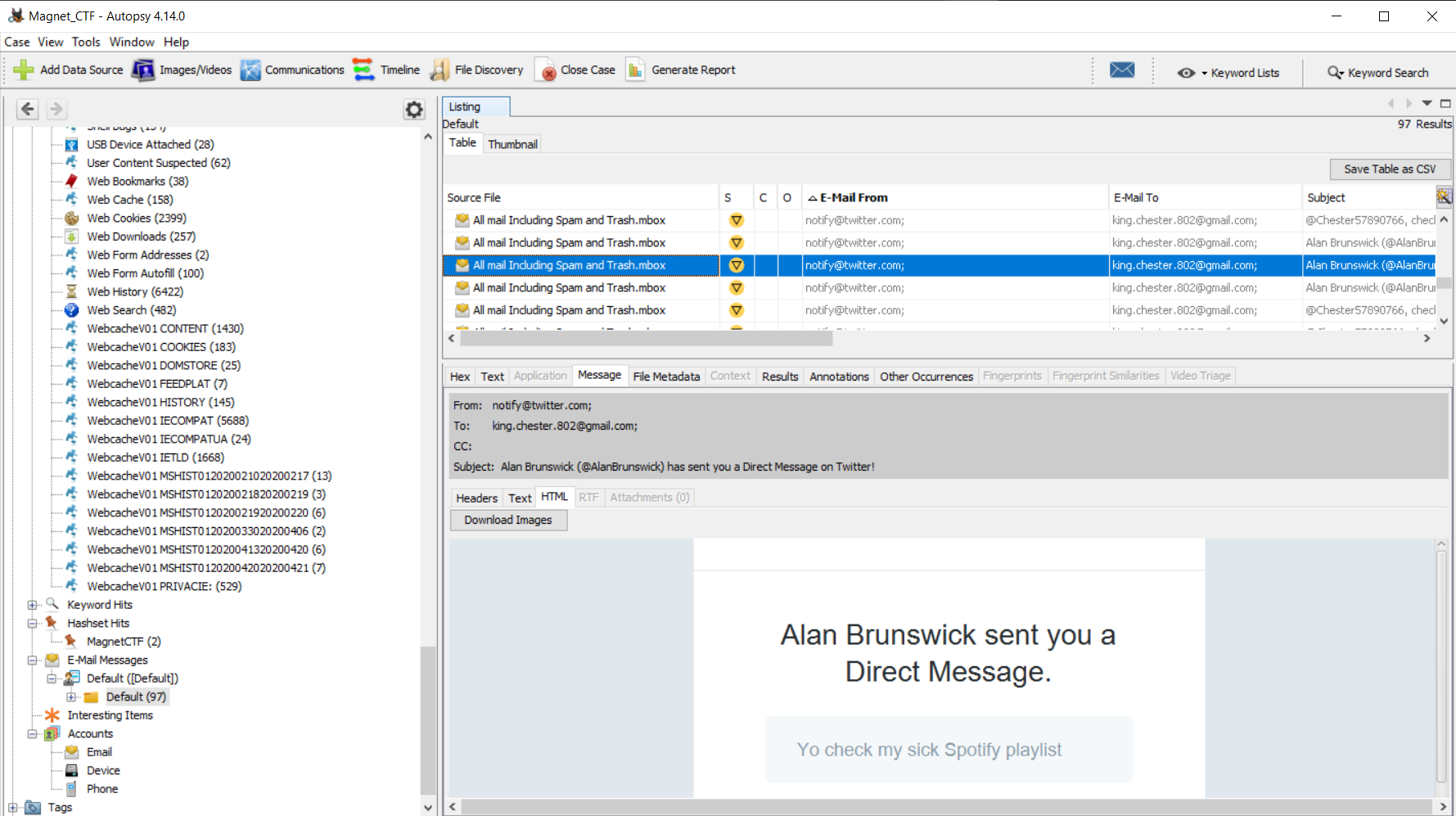
So this one took up quite a bit of time, but ultimately did not find the flag with the iOS data.  While searching for a different flag, I came across several Twitter Direct Message notification emails in the Google Takeout Mbox file. 


There was mention of Spotify, so I started to follow the links sent in the DM email notifications and landed on a Spotify playlist. 


The flag is comprised of the three songs on the playlist "


  • Plug it in plug it innnn
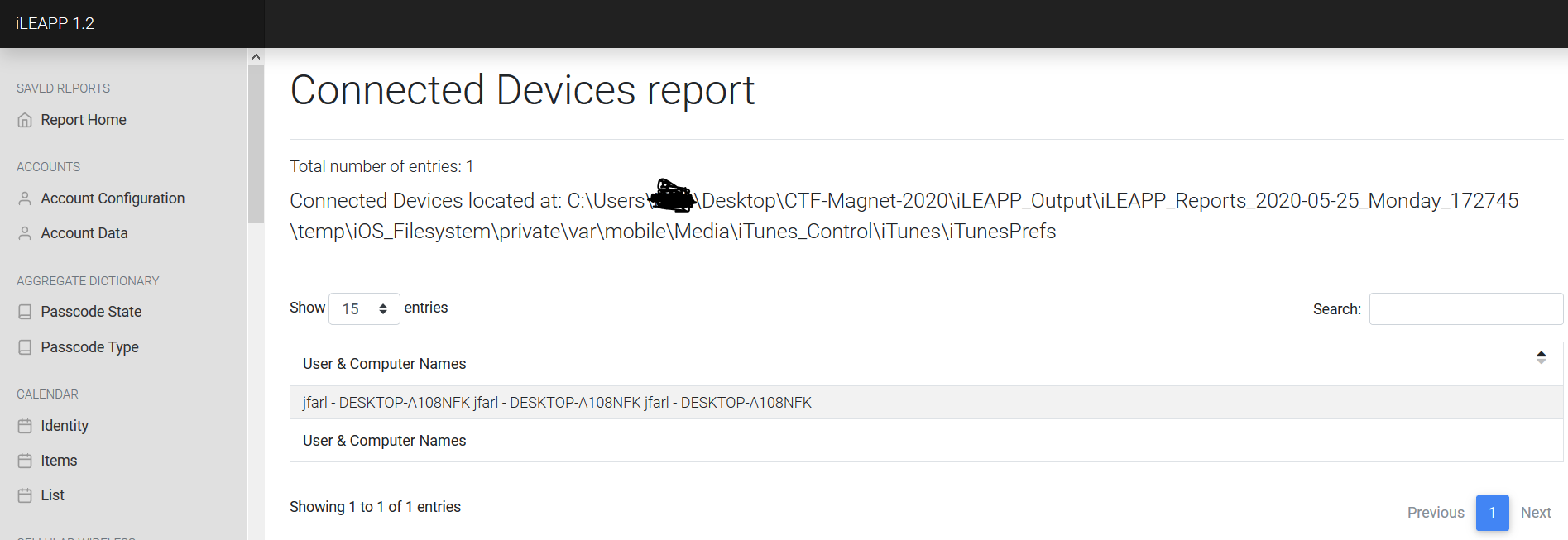
What is the name of the computer that was used to sync with this device?

This flag again can be found in multiple places.  One place is again iLEAPP Report Home on the Device Details Tab.  The second place is the Connected Devices Report.  The flag was DESKTOP-A108NFK.


  • SNAP.. That's going int my cringe compilation
How many applications have iOS Snapshots?

I did not find the flag for this question.

  • Spraaang Breaaaak
How many guests were registered in the trip to Disney?

Warning: You only have 3 attempts at this

I did not find the flag for this question.

I encourage everyone to go and check out iLEAPP by Alexis Brignoni and the YouTube videos he is putting together.  Get involved in the community, support and contribute to Open Source Developers, but above all get out of your comfort zone and participate in a CTF. 

Wednesday, June 17, 2020

#MVS2020CTF Write-Up (Windows)

Here we have the Windows questions and solutions that were part of the 2020 Magnet Virtual Summit CTF.  Again keeping with the theme of using #OpenSource or free software, I used Autopsy to process the forensic image, and also used UnFurl, IrfanView, StegHide, OpenStego, and CyberChef to help with other questions.  As you will see below I did not find all of the solutions, but I hope the information I provide is helpful to anyone who have never tried a CTF or is new to DFIR. 

  • Begin Exam Try 2
When did the windows image acquisition start?

Answer in YYYY-MM-DD HH:MM:SS

So initially I believe this question asked who the examiner was, and after 10-15 minutes of digging around for the solution (Expecting to find it in the DFA_Windows.E01.txt), I reloaded my browser and saw the "Try 2".  So looking at the same text file, we find that the "Flag" is 2020-04-22 17:55:30.  This is documented under Image Information, as the Acquisition Started Time Stamp, which needed to be converted from Wed Apr 22 17:55:30 2020 to the Flag Format provided.

  • Call Me Maybe?
What is the user's phone number? (Format: 555-555-5555)

After processing the Windows Image using Autopsy, I looked in the Web Form Autofill results, where the flag of 802-265-5115 was located.


  • Feelin' Lucky?
How many people won Quarterly Drawing 31?

 1
 10
 100
 1,000
 10,000
 100,000

This was a multiple choice question, but I didn't find the solution. 

  • Update the Résumé
When did the user start working in their current position?

(Example: flag<July 1776>)

This was another question that I did not solve, despite going through User Documents, Keyword Searches, Filtering by File Type looking for a CV or Resume.  After reading over the write-up by @KevinPagano3 on stark4n6.com, the solution required combining the Chrome Login artifact for a LinkedIn account along with some OSINT to find the flag of July 2014.

  • Another day, another dollar
How many times did Warren sign in to his machine?

This flag was found in the Autopsy Extracted Content, under Operating System User Account, then looking at the Username Warren.  When you scroll down the count with the most recent accessed date can be seen as 24.


  • Hash Crash
What is the earliest created file associated with the following MD5: 3d908e1b40140c1e0167603ffca07701

For this flag, I created a new Hashset within Autopsy and the files with the MD5 hash show up under Hashset Hits under the name of the name of the Hashset.  Flag is AccessMUISet.msi as the created date is the earliest.


  • Sticky Situation
How many dollars does the user CURRENTLY owe from gambling? Format 99,900

I did not find the flag for this question.

  • Money, money, money, Money!
How many dollars to directly buy in to the tournament on Sunday?

This flag was found using a keyword search in Autopsy for "tournament".  A link in the Chrome History shows a website URL for a Poker Tournament.  A quick copy/paste of the URL into a browser brings us to a website where the buy in for Sunday Tournaments is shown as $162.


  • Sorry, eh?
When was the image downloaded from www.sciencenews.org viewed? Format MM/DD/YYYY HH:MM:SS (24 hour clock) ex 05/12/2020 17:45:00

Searching for the URL produced the the data associated with the download, but those times were not accepted as the flag.  I later found again from the write-up by @KevinPagano3 that the time of opening was from the LNK file associated with the downloaded file.  Half Credit doesn't get any points in a CTF.

  • Stay PAWsitive
What is the name of the movie written in the text file within a PNG?

I spent quite a bit of time on this question, as I was certain based on the "PAW" clue that the flag could be found within the /Users/Warren/Documents/Cats directory.  All three files were named with "motivational" phrases, and the actual images were motivational memes, which matched the clue in the question.  Only one of the files was a .PNG and it was also much larger than the other files.  After exporting the file I used Steghide, a steganography tool, but had no luck. I then imported the file into CyberChef and again had no luck.  I then tried Steghide again, using various passwords that were in the E01, which all yielded nothing.


I then started to discuss the CTF with @Evandrix who had completed all of the questions.  He then pointed me towards a tool called OpenStego, which immediately without a password extracted the text file, revealing the flag of Godzilla. 


  • What happens when you text and drive?
Name the bug check code in the most recent Windows crash (Blue Screen)

I did not find the Flag for this question.

  • You're GUIDing, right?
What is the GUID for the application that was last used to access C:\Users\Warren\Documents?

I did not find the Flag for this question.

  • Poker, I don't even...
How many total seconds did the user spend on the page when they searched for quick online poker? format: x.xxx

At first I thought this would be a straight forward solution.  Using a keyword search in Autopsy for "quick online poker" yielded several results and I focused on the results that were an exact match and couldn't find anything related to the time spent on the page.  As the #MVS2020 sessions continued, I attended the "Ask Us Anything" Session, where there was a discussion about a tool called UnFurl.  I downloaded the tool and setup all of the requirements (there is also a online/web version available).  I continued to focus on the exact match of the term, but still was not able to find the correct flag.  Again I discussed the CTF with @Evandrix who suggested that I look at the other results for the search, which led me to the flag of 6.294. 


Overall a great experience, which tested my knowledge on particular artifacts, and allowed me to add to my toolbox of free and open-source tools. 

Friday, June 5, 2020

#MVS2020CTF Write-Up (Memory)

This post will be short as it only covers the Memory Section of the Magnet Virtual Summit 2020 CTF and I didn't find all of the solutions.  Once again this was my first time analyzing memory, and was mainly completed from notes that I had taken during the presentation by @melton_tarah, and coupling that with prior experience cracking passwords. 

Memory
  • How's Your Memory? - Which memory profile best fits the system?
 Win8SP0x64
 Win7SP1x86
 VistaSP1x64
 Win7SP0x86
 Win10x86
 Win7SP1x64
 WinXPSP1x64
 Win10x64

Win7SP1x64 - The profile is found by using the imageinfo command for Volatility as seen in the image below. 


  • Hash Slinging - What is the LM hash of the user's account?
aad3b435b51404eeaad3b435b51404ee - This flag is found using the hashdump command in Volatility and then taking the hash from the Warren account.


  • Cache Money - What is Warren's Ignition Casino password? (Case Sensitive!!!!)
WHbigboy123 - The lsadump command in Volatility revealed a password of warrenhbigboy123.  I then used BulkExtractor to pull strings from the memory with the wordlist function.  Once the memory sample was processed in BulkExtractor, I searched for the root word/phrase of "bigboy".  This strategy which has been helpful in password cracking competitions as well as defeating encryption during investigations from password re-use paid off once again and the flag was found (as seen in the image below).


  • Never Tell Me The Odds... - It seems like Warren may have let his addictions slip into his work life... Find the program in question, recover it from memory, and give the SHA1 hash.
I did not find this solution...

Thursday, June 4, 2020

#MVS2020CTF Write-Up (Egg Hunt)

This post will cover a walk through of the solutions that I was able to find for the Egg Hunt section of the 2020 Magnet Forensics Virtual Summit CTF.  This was solved using GCHQ CyberChef (https://gchq.github.io/CyberChef/).  

Egg Hunt

NOTE: The FULL block of text below IS the puzzle, for each level, please copy the NEW block of text located below the now decoded portion.

Puzzle starts here (Copy ALL text below):

Zpv ibwf gpvoe uif CMVF fhh! Uif ofyu qjfdf pg uif qvaamf jt: Mci vojs tcibr hvs UFSSB suu (gsqfsh kcfr = Cbwcb)... hvs bslh dwsqs ct hvs dinnzs wg : KK91WUvvraIuNa91paEurUvzWS9GEI5VFGPzN2qiZw4urUvzWU5zsVEuqUzzM2Iup2MurUvzWVP1sbdgNGPdqmOco2J5WR0upKTbpaJ0YHcYo29vWVJzp3SuNbJcqbquNavfWUJdrmPlN20iZw4uN2l4WVdzNUqurUXlM2guMacupLFzWVNcNVB4NGPjNxcYMaJ5rU9ho2SvWU5gpQPcqVz5rmPhNbcupLvjM2zlWU9arQ4iZwPhNbcupaT6swPzpRcuqav6qkcY
  • Quit ROMAN around and find the ONE egg - What is the color of the first egg?
BLUE - By taking the entire text from above and pasting it into the input field on CyberChef, and using the clue of ROMAN, I used the ROT13 decode option and began to change the number of rotations down.  At 12 I could see the second line decode, so using the second clue of ONE, I went to -1 and found the answer, which would lead me to see that the second question could be decoded with a plain ROT13. 


  • Last one there is a ROTten egg - What is the special word?
Onion - Again using CyberChef, we use the plain ROT13 rotation to find the flag.


  • Probably the most baseline egg - How is the Orange Egg encoded?
Base64 - With the clue of "baseline" in the question, using CyberChef and selecting Base64 decode the text is decoded.


  • Opposites Attract - What was the key used to unlock this cipher?
magnet - This key was displayed after decoding the previous text.  Once again using CyberChef, but this time using Vigenère cipher with the key of "magnet", you get the next message show in the screenshot.


  • Hey coach, I'm going to need a SUB - What is the final message of the completed egg hunt?
bean - With only the final line of the Egg Hunt left, I continued with CyberChef and began to try different ciphers.  Focusing on those that use an alphabet substitute based on the clue of "SUB".  I ultimately found Atbash Cipher which revealed the final flag.


#MVS2020CTF Write-up (Android)

In May 2020, I participated in the Magnet Virtual Summit CTF Competition, which consisted of an iOS Extraction, Android Extraction, Google Takeout, Windows E01 Image, and a RAM Capture.  I would consider this my first real attempt at competitively participating in a DFIR Style CTF and I truly enjoyed each and every aspect.  Before I get into the solutions I was able to find, let me start off by saying that I enjoy learning new skills, and I am a huge fan of open source tools, and validating paid commercial tools with free tools if possible.  With that said some of the tools I used to find solutions were Volatility, Autopsy, ALEAPP, iLEAPP, Notepad++, BulkExtractor, Irfanview, unfurl, GCHQ CyberChef, DB Browser (SQLite), and Cellebrite Physical Analyzer.  Also I have to give credit to Tarah Melton (@melton_tarah) for her presentation on Memory Analysis, as I had never worked with a RAM Capture before, yet I was able to solve most of the memory based questions using notes from her session.  Also a huge thanks to @evandrix for helping confirm I was on the right path for some questions.  A great job by Jessica Hyde (@B1N2H3X) and the whole @MagnetForensics Team.  Let’s get started with the Android Section…


Android

  • Just another pawn - What is the username for the Zynga Chess app?

chess.master.chester – This was found using ALEAPP under Chrome Login Data

  • Obfuscating Like a Pro - Chester decided to use a covert app to communicate with Alan, to try to cover their tracks. What is the package name of the app? flag<com.full.package.name.here> (Do not include flag<>, just write out the package name) Hint: https://youtu.be/wEv0zOeA2FU?t=152

Com.zynga.chess.googleplay – This was found using ALEAPP under the Installed Apps, and could also be found in the Chrome Login Data found above.  This was based on the previous question asking for the username for the Zynga Chess App and knowing it had a chat feature.

  • The College Lifestyle- Artic Edition - Where did Chester get ramen in Norway? (Restaurant Name)

Koie Ramen – Since this was an Android based question and asking for a specific location, I started in the Google Takeout Files.  After finding IMG_20200309_172817.jpg, which was a bowl of Ramen, I opened the file in IrfanView, viewed the Exif data and then viewed the Geo-Coordinates in Google Maps.  After a slight zoom you are able to see that the photograph was taken inside of Koie Ramen Restaurant.

  • Blocked for security reasons! - What is the name of the file that this user attached/linked and emailed to Warren?
Chestnut_CV.exe – Was found in an email message, parsed by Autopsy, which included the file as a Google Drive Download/Access Link.
  • bOat-SINT - While on spring break, Chester took a photo of a famous boat. What is the boat's name (2 words, ______ ship)?

Oseberg Ship – Was found based on the OSINT hidden in the question.  After finding the photograph of the boat (IMG_20200308_144240.jpg) in the Google Takeout, I used Google Image Search to locate the name of the ship from the Museum website, which contained a similar image. 

  • Fastest Thumbs in the West - How many tweets did Chester tweet?

5 – Was found by manually digging through the Android Extraction in Windows Explorer and then viewing the database in DB Browser.  The file is located at \data\data\com.twitter.android\databases, where I looked for the largest database file which was 1230174369462267904-60.db.  I then viewed the Users Table to find Chester’s ID.  Once I had the ID I viewed the Statuses Table and filtered by Auther.id


  • New IP Who Dis? - What local port was Warren's computer listening on while connected to the IP 13.35.82.31 during the memory dump?

54281 – This was found by reviewing the output of the “netscan” command on the RAM Capture in Volatility, which revealed the port number. 


  • The Polar Express - What train station did Chester get directions to?

Bergen – Was found by looking in the Google Takeout under My Activity\Maps\MyActivity.html.  Once the file was opened in Firefox, ctrl F for “station” and it was listed under a Maps search for Directions To Bergen Station, Bergen, Norway on Mar 10, 2020.

  • You Get a Database! And You Get a Database! - Unbeknownst to Chester and Alan, the app found in the question "Obfuscating Like a Pro" didn't store their chat logs securely. What is the chat message ID for where the target of the hack is declared?

18741612351 – Based on the information identifying the Chess app, I manually searched through the Android extraction with Windows Explorer to look at the databases.  The file was found at data\data\com.zynga.chess.googleplay\databases\wf_database.sqlite.  Reviewing the database you find the message ID where the target is Mallie Sae.


  • Chess Master Chester - What was the first move made by Chester in Chester's Chess game? (Flag is in chess notation (Ex. A1-B2))

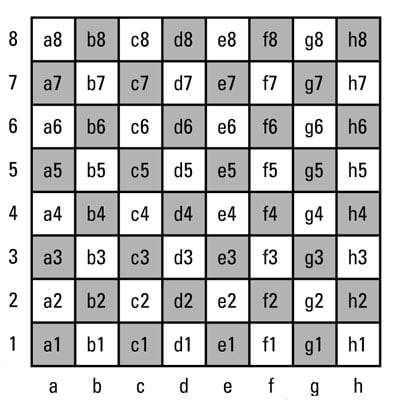
*Chess board for refrence, assume white starts on rows 7 and 8: https://www.dummies.com/wp-content/uploads/201843.image0.jpg

e2-e4 – This one gave me some trouble at first since I didn’t take the time to identify Chester’s user ID, so after several wrong guesses, I realized that Chester may not have gone first.  This was confirmed by finding that Chester is user ID 237046613 in the Users Table.  So then using the data in the moves table x1=4 y1=1, which identifies the pawn on e-2. (Looking Lower left of the chess board image 1 = 0 and a = 0 for counting purposes) then x2=4 y2=3, meaning the pawn moved forward two spaces to e-4.  This is also validated, by looking at line 3 of the moves table, and examining the data column, which displays the prev_board (naming the pieces by their first initial, and Empty spaces are identified with “e”)


  • Take the Red Pill, Chester - Chester configured a moving matrix background on his phone. What did Chester set the falling speed of the characters to?

*Demonstration video located at data/media/0/AzRecorderFree

50 – Found while reviewing the installed apps in the ALEAPP report (com.gulshansingh.hackerlivewallpaper).  I then manually found in Windows Explorer the preferences stored in an .xml file located at data\data\com.gulshansingh.hackerlivewallpaper\shared_prefs.  Viewing the .xml in Notepad++ you can see the “fallin speed” value is 50.


  • Best Foot Forward - What was the percentage likelihood that the Android user was walking on Fri Mar 6 2020 at 20:50:27 UTC

95 – This was found based on my prior knowledge of data stored by Google in the Takeout related to Location History.  I searched in the Takeout\Location History directory and then opened the “Location History.json” in Notepad++ with the JSON Viewer Plugin.  Then I used an online time converter to convert the Time/Date Stamp from the question into EPOCH and searched for the EPOCH value in Notepad++, which showed a confidence of 95 for Walking.


2021 Crack Me If You Can Contest Write-Up

Once again KoreLogic hosted the Crack Me If You Can password cracking contest during DEFCON 29.  I participated in the Street Division as a ...